Contact Us
[contact-form-7 id="ceb4db8" title="Contact form 1"]

Email as a productivity tool continues to be critical for day-to-day business operations. Whether it’s coordinating internally, engaging with customers, or reaching out to vendors, there’s no shortage of emails being sent and received every day. Considering the sheer volume of emails we interact with every day, it’s more important than ever to make sure employees can recognize and avoid phishing scams.
Human error is one of the biggest sources of cybersecurity incidents. A hacker’s easiest path to your sensitive information is through tricking end users. A simple clicked link in a phishing email can cause serious disruption and compromise of sensitive data.
This whitepaper will be an in-depth exploration of the TracePhishing platform and its capabilities.
TracePhishing is our software tool to perform phishing testing against end users. Our information security analysts use it to perform managed phishing campaigns, and our customers can use the same tool to run testing on their own.
The TracePhishing module lives within TraceSecurity’s proprietary platform, TraceInsight. TraceInsight also houses the TraceEducation module, the security awareness training platform that directly integrates with TracePhishing. More on that later!
Users are managed at the TraceInsight level through individual creation or .csv upload. Users can be organized into groups for varied course assignments, such as by department or by location. This makes user management easy and seamless between the TracePhishing and TraceEducation modules.
The TracePhishing Platform includes a wide variety of phishing templates to test your employees against. Only those administering the phishing testing need to have TraceInsight accounts to set up distribution groups and campaigns.
TraceSecurity implemented multi-factor authentication for TraceInsight in August 2023. MFA works through any one-time passcode (OTP) application such as Google Authenticator, Microsoft Authenticator, Symantec VIP Access, and more. Email and SMS-based MFA are not currently supported.
The TracePhishing Platform includes eight tabs for functionality: Dashboard, Campaigns, Users & Groups, Email Templates, Landing Pages, Sending Profiles, Campaign Bundles, and Documentation. Here are some details about what each tab is designed for:
The Dashboard serves as the Home page for TracePhishing. It includes a line graph of all phishing engagements over time, and overall statistics on emails sent, emails opened, clicked link, submitted data, and email reported.
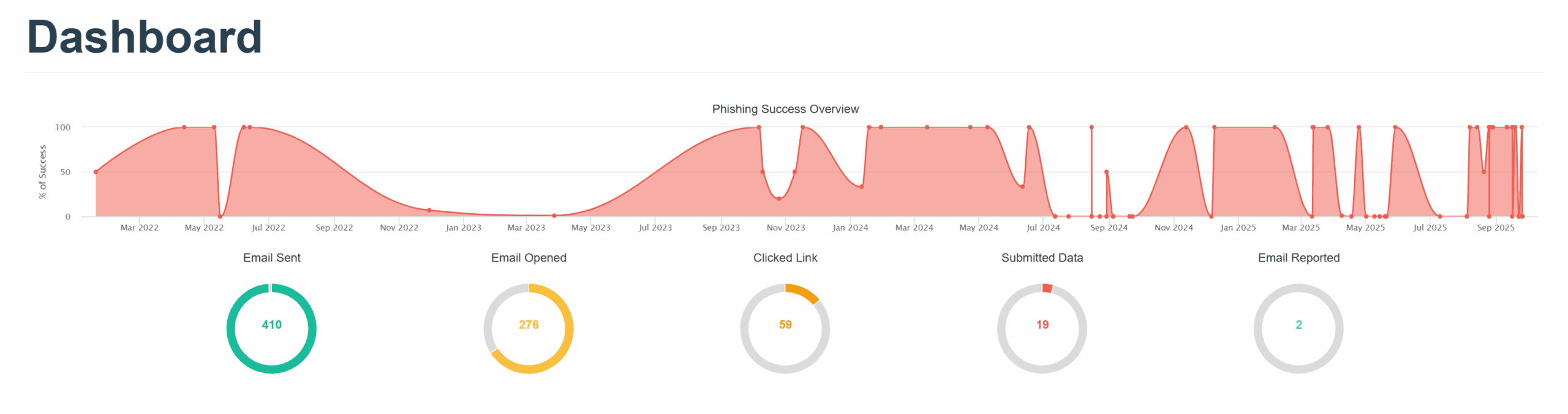
Below the total stats, there is a data table of each campaign that has been scheduled. You can View Results of any campaign to get the graphs and statistics for each individual phishing test. Clicking into this view will give you a table of all Users included in the campaign and the status of their interaction with said campaign. Each campaign also allows you to export results via CSV or PDF.
The Campaigns tab is where you set up phishing tests to be sent to your users. This tab is split into Active Campaigns (in progress) and Archived Campaigns (completed). You can access the individual statistics per campaign here, just like you can from the Dashboard page, by clicking the green “View Results” icon.
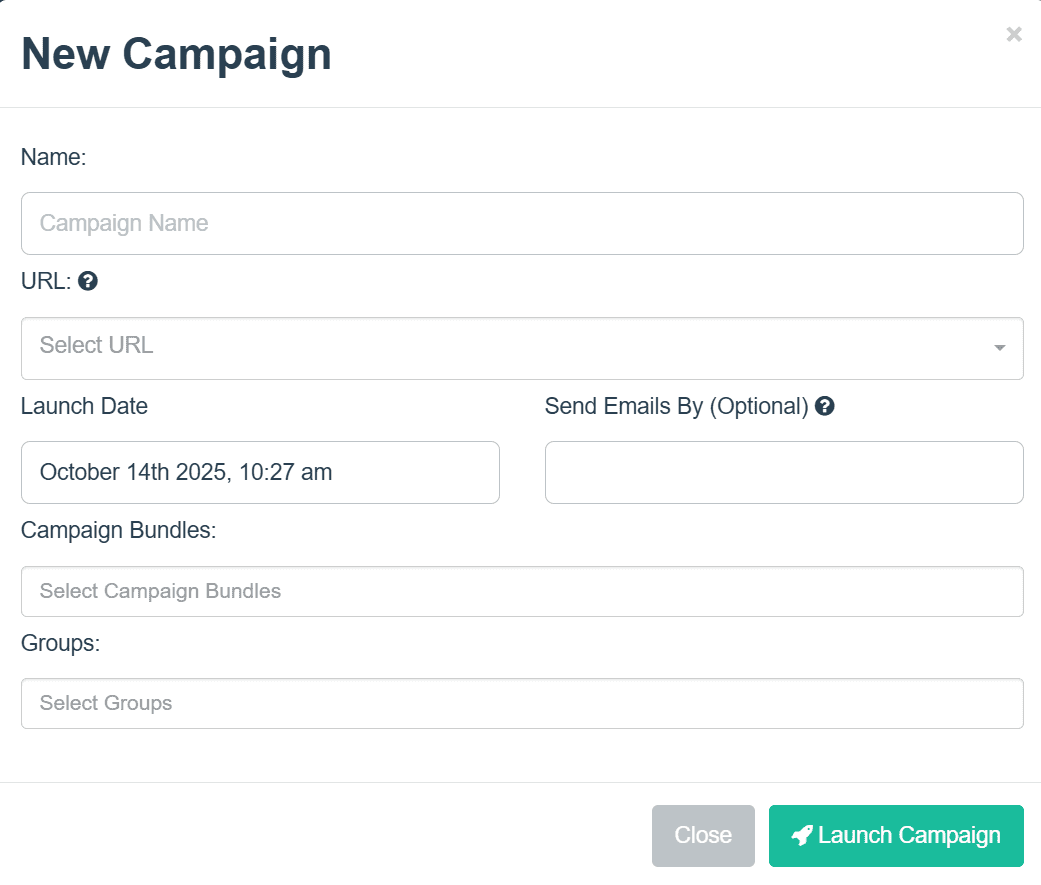
To start a campaign, click ‘New Campaign” and fill out the information in the dialogue box. This will include a unique campaign name, the phishing URL for the email, start and end dates, the Campaign Bundle to be used (more below) and the Group to send it to (more below).
Once it’s set up how you like, click “Launch Campaign” and it will begin sending the phishing tests at the specified date. If you do not specify an end date, the campaign will assume you want all of the emails sent immediately after the launch date.
If there is a specified end date, TracePhishing will automatically send the emails at even intervals between the start and end dates.
NOTE: Deleting a campaign DOES NOT archive it. Campaigns are archived once you press the complete button. Deleting a campaign deletes it from the system entirely and cannot be undone.
To send phishing campaigns, your Users must be in a User Group. This is managed at the TraceInsight level so that groups can be used across our various software modules. User Groups can be for your entire company, spit into certain departments, geographical areas, or any other logical groupings you want to make.
The Users & Groups tab shows the Groups you have set up with the group name, number of members, and last modified date. You can easily view the members in a given group by clicking the green “View Users” icon, but any changes that you need to make to groups needs to be done at the TraceInsight level.
The Email Templates tab includes all of the simulated email phishing templates that you can use in phishing campaigns. There are currently over 40 templates available, with more being added regularly. Templates include common pretexts like coupons, gift cards, failed login attempts, one-time verification codes, shipping updates, security breach notifications, and more.
Upon request, TraceSecurity can custom develop phishing templates based on your specifications. This could be things like spoofing a particular vendor you use, spoofing an internal employee or executive, or using the branding from a local business.
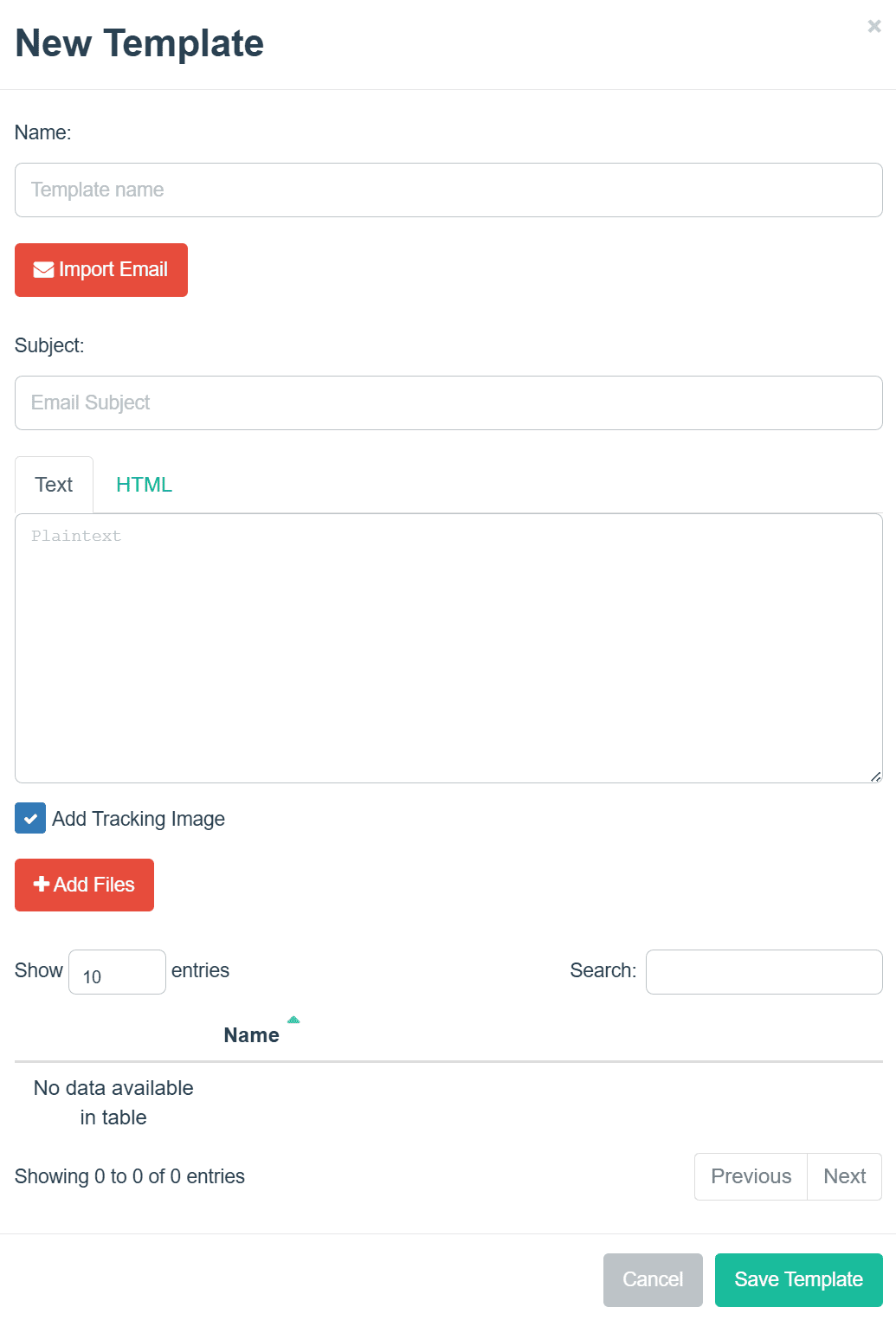
The Email Templates tab also allows you to add your own custom phishing emails via HTML. When you click “New Template” it will prompt you to input a Template Name, Subject, email body HTML, and optional images.
You can toggle between the HTML and Plaintext versions of the email body so you can make sure you like how it’s going to look when sent. If you want to embed local images into your custom HTML code, you can upload them through “Add Files.” The documentation for TracePhishing includes details on how to add the images into your HTML code.
The Landing Pages tab includes several options for the webpage associated with links included in the simulated phishing emails. There are several options that we provide, with certain benefits for each type:
There is an option to add your own custom landing pages via HTML. TraceSecurity can also assist with developing specific HTML landing pages upon request.
The Sending Profiles tab is where you configure the email addresses that the phishing tests will be sent from. Sending Profiles can be essentially anything you want – a spoofed internal employee, a fast food chain, a vendor your company uses, and more. Depending on how you want to test your users, the Sending Profile you use could be a direct spoof of a known email address, or a known email address with a small typo.
EXAMPLE: johndoe@company.com vs. johndoe@c0mpany.com
Please keep in mind that anti-spoofing technology is being applied at multiple levels depending on your environment (cloud-based email filter, native filtering in email server, etc.). TraceSecurity provides a library of suggested Sending Profiles ending in our proprietary phishing domains which, based on SPF and DKIM checks, may be more successful in making it through multi-layered defenses. You may need to send test phishing emails to yourself to study the behavior of your anti-spoofing technology and adjust your Sending Profiles accordingly.
Campaign Bundles are the required building blocks of your phishing campaigns. A campaign bundle is comprised of:
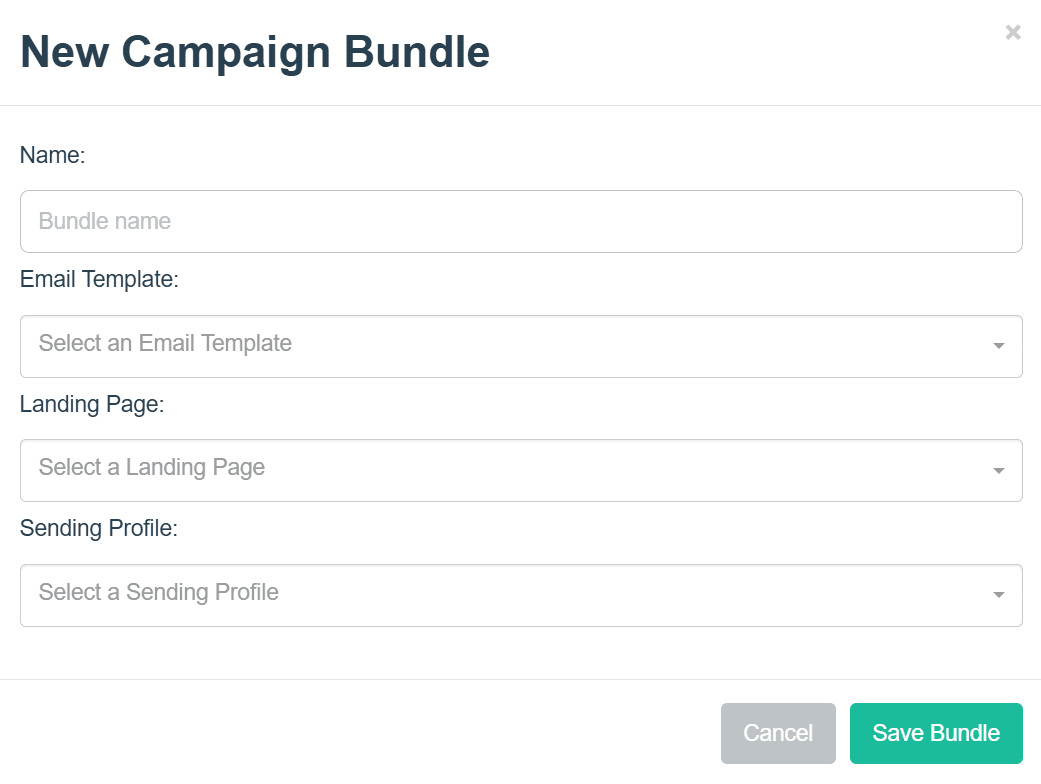
Click “New Bundle” to get started, give it a name, and make your selections from the dropdown menus. Once you save your Campaign Bundle, it’s ready to be used in your phishing campaigns.
The TracePhishing User Guide includes everything you need to know about user management, campaign assignments, scheduled distributions, and more.
If you can’t find your answers in the User Guide, TraceSupport is available during normal business hours for any issues you may run into. They can be contacted by phone at 877-798-7223 or by email at support@tracesecurity.com.
TraceSecurity also offers TracePhishing as a service, performing the phishing campaigns on your behalf. This can be a single, one-off email campaign, or campaigns at regular intervals throughout the year – what we call Managed TracePhishing. Managed TracePhishing is conducted quarterly by default but can be customized to be at your preferred intervals.
The TracePhishing Platform allows for on-demand reporting per campaign via CSV export or PDF report. The CSV includes usernames, titles, email addresses, campaign test status, campaign send date, and the campaign bundle used in the test. The PDF report includes an executive summary of the campaign, campaign results by status graphs, and the users included in the campaign – names, emails, test status, and email campaign used.
When TraceSecurity performs phishing engagements on your behalf, you will receive a formatted PDF report of the completed campaign(s). This report includes an executive summary, details of the email engagement(s) with graphs, and the users included in the campaign – names, emails, test date, test status, and screenshots of the email campaign used. The deliverable will also provide you with analysis of current trends in phishing attacks to better inform your security posture based on the results of your simulation.
Sample reports are available upon request.
TracePhishing directly integrates with TraceEducation. Both modules are maintained within our TraceInsight platform, using the same user management to easily pair phishing campaigns with video training. Each TraceEducation Course includes an animated video with voiceover followed by a three-question quiz.
TraceEducation trainings can be assigned based on a variety of TracePhishing Campaign triggers:
TracePhishing automatically includes access to the Basic TraceEducation Video library, consisting of 4 video courses related to phishing security awareness. Users who fail phishing attempts can be automatically assigned one or more of the Basic Courses to reinforce phishing best practices.
The Full TraceEducation Video library is available at an additional cost, and includes video courses on topics such as phishing, vishing, smishing, malware, ransomware, passwords, updates, and more. TraceSecurity regularly uploads new video courses to stay up to date with real-world security risks.
Pro Tip: Delay the training assignments until after the round of phishing testing is complete so that other users do not get wind that testing is happening.
Attackers are always coming up with new ways to try to trick your employees. All it takes is one person to compromise an organization, and you don’t want it to be you. Regular and varied phishing training could be all the difference in avoiding a phishing scam.
Ready to start testing your employees? Get in touch today!